


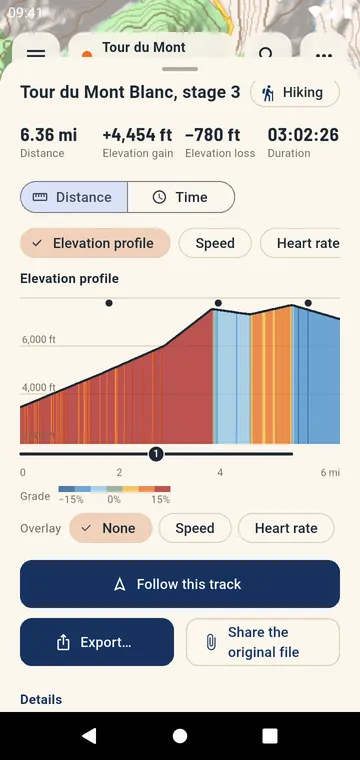
The figures that matter
Distance, elevation gain and loss, highest point, total and moving time, average and maximum speed or pace. GPX Atlas computes them the way the trail is walked: noise in the altitude is smoothed, stops are not counted as moving time, and the settings that change the result are yours to adjust.
A profile you can read
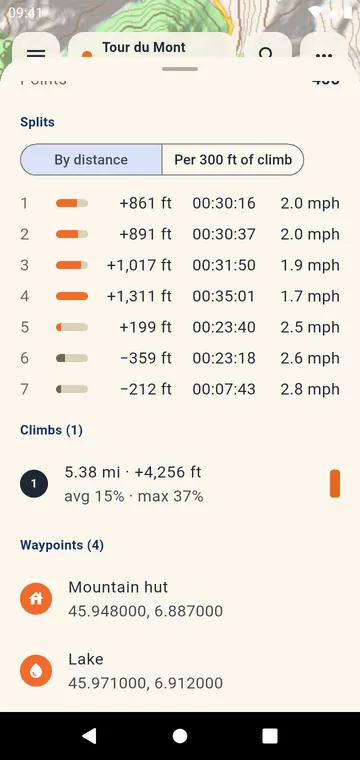
The elevation profile is colored by slope in fixed classes — the same colors on every track and on the map — and each climb is numbered and listed with its length, gain and average grade. Slide your finger along the profile and the point moves on the map; pinch to zoom on a climb.
Sensors and splits
Heart rate, cadence, power and temperature from your watch or sensors get their own charts, over distance or over time. Splits come by kilometer, by mile or by 100 m of climb, with time, speed or pace and gain for each.
Compare and correct
Compare two tracks on the same profile. A route drawn on a map, without altitudes, can take its elevation from the terrain, with a before-and-after preview. A PDF report gathers the map, the profile, the figures and the splits.