Start from wherever you are
Choose Follow this track and the direction. If you are not on the track yet, the screen shows Join the track, the distance and a dotted line to the nearest point. On a loop or an out-and-back, GPX Atlas stays on the part of the track where you are, even where the path passes twice. If you walk the other way, it offers to follow the track in that direction.
Turn by turn
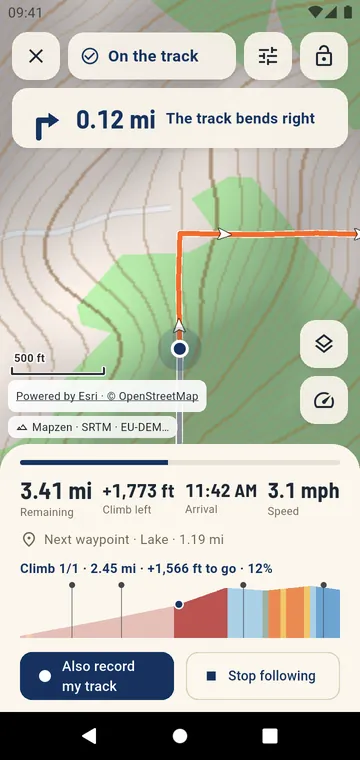
The next turn appears at the top of the screen, with an arrow and its distance. It is announced about 25 seconds before you reach it, then again just before. A left turn gives two short vibrations, a right turn one long vibration, and the voice speaks if you turned it on. When two turns are close, the second shows under the first. The directions come from the file when it has them (course points of FIT and TCX files, routes planned in the app). Otherwise, the app reads the bends of the line.
What lies ahead
- the distance and climb left, and your arrival time at your own pace, learned from your past outings, with a warning if it falls after sunset;
- the profile of the next kilometers, colored by slope; at the foot of a climb, a page for the climb with its length, gain and grade left;
- the next waypoint, and how far ahead or behind the times of the track you are when the file has times.
Alerts you can trust
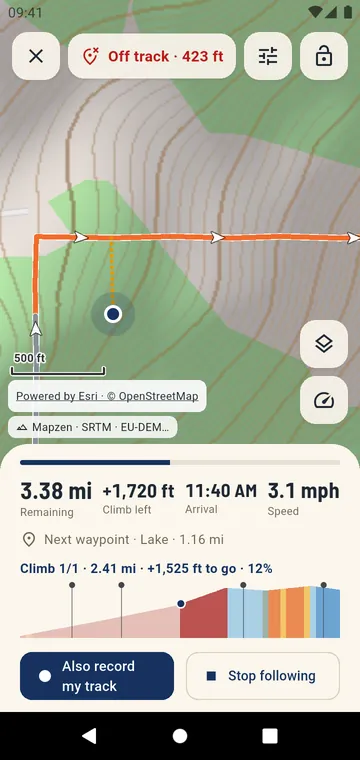
Off-track and wrong-way alerts use a margin. The margin grows when the GPS is less precise, in a forest or a gorge. The dotted line back points to the track ahead of you, not behind. Reminders come less and less often, and a touch silences them.
With the phone in your pocket
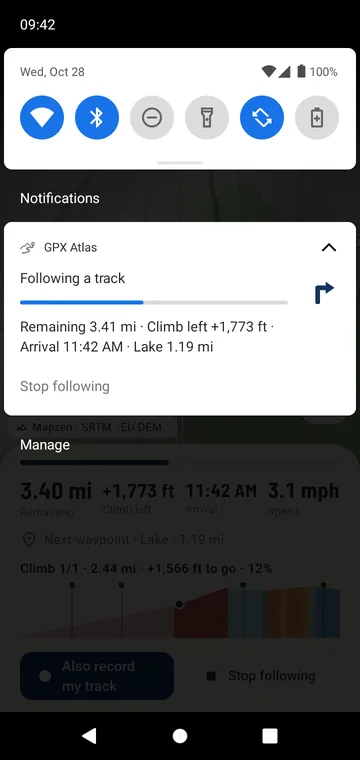
The notification shows the arrow of the next turn and your progress, on the lock screen too. The screen can stay off and wake up for each turn, climb or alert. A padlock blocks accidental touches. The dashboard shows four big numbers, for a phone on the handlebar.