


Four backgrounds, one button
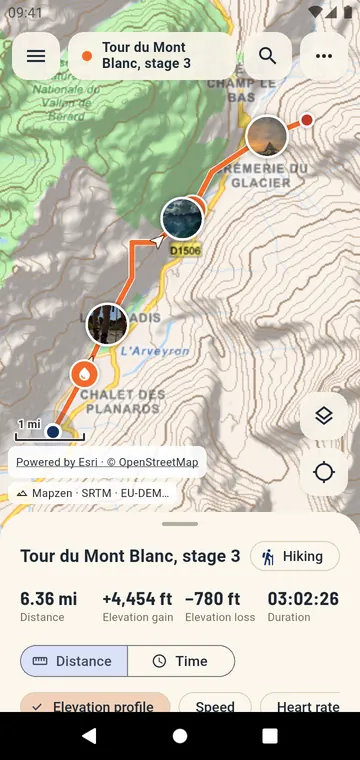
The layers button, at the bottom right above My location, switches between the street map, satellite imagery, a hybrid of both and a terrain map with contour lines. It lights up when you are not on the street map.
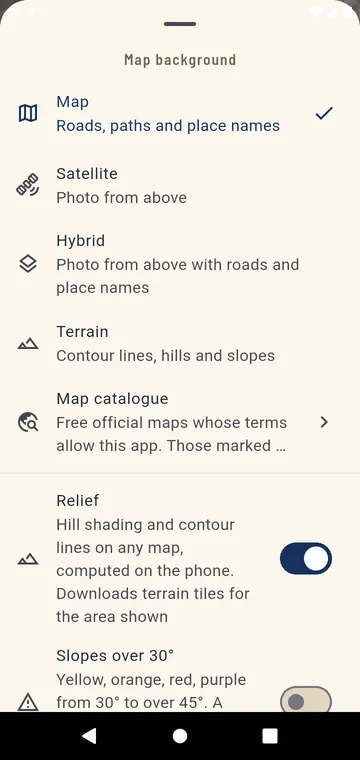
Relief on any map
The Relief switch draws hill shading and contour lines over any background, satellite included, computed on the phone from public terrain data. Slopes over 30° can be painted in yellow, orange, red and purple — a guide, not an avalanche assessment.
Official maps and your own
The Map catalogue lists free official maps whose terms allow this app, such as IGN in France, USGS in the United States and basemap.at in Austria. You can also add a TMS or WMS server, lay one map over another with an adjustable opacity, or open an MBTiles file you prepared.
Offline, where the publisher allows it
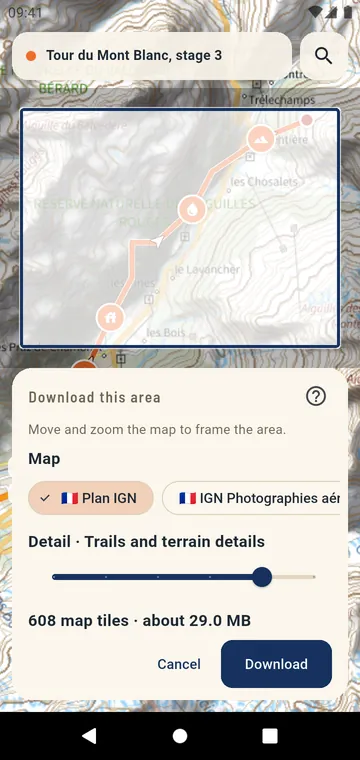
Download an area, or the corridor along a track, of the official maps whose publisher allows it — the size is shown before you start, and the area can be updated later. MBTiles files work offline too. The street, satellite and terrain maps cannot be downloaded in advance: their terms forbid it, and GPX Atlas respects that. Your GPS position, the track and its figures always work without a connection.
Find a place
Search for a place by name, or type coordinates in decimal degrees, degrees and minutes, UTM or MGRS. A long press on the map gives its coordinates, to copy, share or go to. The map can turn with your heading or your direction of travel, and the compass brings north back up.